
Winpal Estimate Invoice Maker
HubfloBusiness
4.615.00 Reviews
- Version
- 1.0.10
- Installs
- 10.00K
- Age Rating
- Everyone
Screenshots
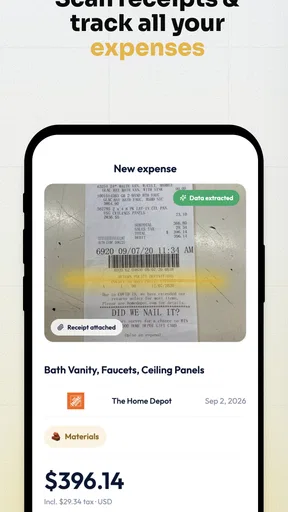
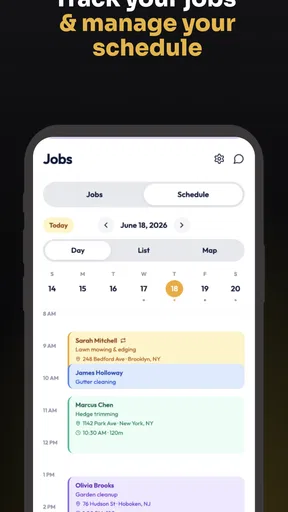
Our Review of Winpal Estimate Invoice Maker
 Analysis by Appyee
Small businesses often lose time in the least glamorous part of the job: turning a completed estimate into a clear invoice, sending it while the details are fresh, and keeping the paperwork consistent enough that a customer knows exactly what to approve and pay. That is the problem Winpal Estimate Invoice Maker is built around. I found its appeal less in flashy extras and more in reducing the gap between doing the work and asking to be paid.
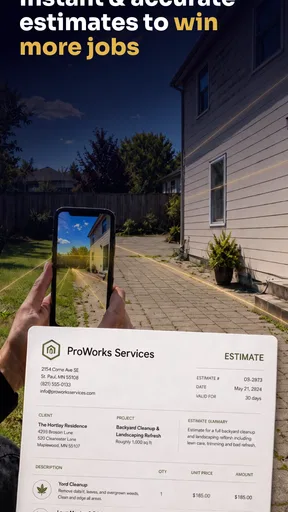
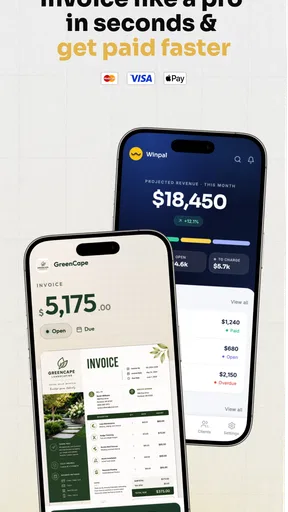
As a business app from Hubflo, it focuses on professional estimates and invoices rather than trying to become a complete accounting system. The store describes it as a way to create those documents quickly, and that narrow purpose is important. If you run a service business, take on independent jobs, or regularly quote work from a phone, a dedicated document maker can feel much easier than adapting a spreadsheet every time.
My overall impression is that Winpal is most useful when speed and presentation matter more than deep financial administration. I would recommend trying it to someone who needs a practical way to prepare customer-facing paperwork, but I would not treat it as a replacement for bookkeeping software, tax management, inventory control, or a full customer relationship system.
Why estimates and invoices become a daily bottleneck
The recurring problem is rarely the arithmetic itself. It is the interruption. A customer asks for a quote while I am between appointments, a job changes scope halfway through, or a finished task needs an invoice before the next call begins. When the process depends on a desktop spreadsheet or a document copied from an old file, small mistakes become easy: an outdated service description, an unclear total, or a missing line that has to be explained later.
That is where a focused mobile app makes sense. Winpal Estimate Invoice Maker is designed for the moment when the business owner is away from a desk but still needs to produce something professional. I can see it fitting a plumber, cleaner, photographer, repair technician, consultant, tradesperson, or small agency better than a large company with a dedicated finance department.
The practical benefit is not simply creating a document. It is creating one while the customer, job, and agreed scope are still in my head. A quote prepared immediately after a conversation is less likely to contain vague wording. An invoice prepared at the end of a job is less likely to be forgotten until the following week. That kind of consistency can matter more than adding another complex dashboard.
There is also a presentation issue. Customers do not need to know whether I built an estimate in a spreadsheet, a word processor, or an app. They do need a document that is easy to read, with the work and amount separated clearly. A purpose-built invoice tool is usually more comfortable for that task than a blank page, especially when I am working from a phone.
The first setup should be treated as a business template exercise
My advice is not to open the app only when a customer is waiting. The first useful session should be used to establish the information that will appear repeatedly: business identity, contact details, common services, and the wording that makes an estimate understandable. Even if the initial setup is brief, preparing those basics ahead of time is what turns a document creator into a time-saving routine.
I would also decide on a simple naming habit before sending anything. For example, I might identify a document by customer and job rather than relying on memory. That sounds minor, but it becomes important once several quotes are active at once. A consistent internal routine makes it easier to find the right document when a customer accepts an estimate or asks for a correction.
The best workflow is to separate the estimate stage from the invoice stage mentally. An estimate should describe what I expect to do and what the customer is agreeing to. An invoice should reflect what was actually delivered and what is now due. Treating them as interchangeable can create awkward conversations when the scope changes. Winpal is useful here because it puts both document types in the same business-focused context, but the judgment about when to move from one to the other remains mine.
Before sending the first document, I would read it as if I were the customer. Is the service recognizable without a verbal explanation? Are quantities or units understandable? Is the total visually obvious? Does the wording make clear whether the document is a quote or a request for payment? These checks are more valuable than rushing through a template simply because the app is designed to be quick.
How I would use it during a normal working day
Imagine a small home-repair business receiving a message in the morning about a leaking kitchen tap. After a short visit, the owner knows the likely parts, labor, and scope. Instead of waiting until the evening to rebuild the quote on a computer, the owner can prepare the estimate while the details are current. The customer gets a readable proposal sooner, and the owner has a clear record of what was discussed.
If the customer approves, the next step should be a careful conversion of the agreed work into an invoice after completion. The useful habit is not blindly duplicating every line. It is checking whether the actual job matched the estimate. Perhaps one part was unnecessary, or an extra repair was authorized. Updating the document at that point prevents the common problem of sending an invoice that still describes the original plan rather than the finished work.
A second scenario would be a freelance designer who handles several small projects in a week. The urgent need is not complex accounting; it is producing a professional estimate for a new request without stopping to format a document from scratch. Once the project is accepted, an invoice can follow the same general structure. The time saved comes from repeatability, while the freelancer still keeps control over the wording and amount.
For a mobile service provider, the app could be most valuable at the edges of the day: before leaving for an appointment, immediately after inspecting a job, or just after delivery. Those are moments when a laptop may be inconvenient but a phone is already available. The workflow also encourages a useful discipline: quote promptly, document changes, and invoice close to completion instead of allowing paperwork to accumulate.
I would not use it as an excuse to skip customer communication. A well-made invoice cannot resolve an unclear agreement. If a job has several stages, unusual payment arrangements, or materials that may change, I would explain those points directly and use the estimate to support that conversation. The app can organize the commercial document, but it cannot replace the judgment needed to define the work.
Where the app removes friction
The strongest friction removed is the blank-page problem. Starting with a business-oriented document is different from opening a generic note or spreadsheet and deciding how everything should look. That matters when I am working quickly and do not want formatting to become the main task.
It also reduces the mental switching involved in moving between quoting and billing tools. Keeping estimates and invoices within one focused app makes the process easier to remember, particularly for someone who does not issue dozens of documents each day. The value is cumulative: fewer improvised files, fewer inconsistent layouts, and fewer moments spent searching for the last version.
Another useful insight is that speed should be used to improve accuracy, not merely to send documents faster. I would use the saved time to make service descriptions more specific. “Repair work” is weaker than a description that tells the customer what was inspected or supplied. Clearer line items reduce follow-up questions and make later invoice checks easier. In that sense, the app’s real advantage is not just document creation; it creates room for better documentation.
There is a second trade-off worth noting. A dedicated invoice app can be more approachable than full accounting software, but that simplicity means I should keep a separate process for broader financial records. I would not assume that preparing an invoice automatically handles tax reporting, expense tracking, reconciliation, or long-term business analysis. If those tasks are central to the business, a bookkeeping platform may be the better primary tool, with Winpal used only for fast customer documents.
The app’s store rating is a 4.6 average from around 385 ratings, and it has passed 10 thousand installs. Those figures suggest that it has attracted a meaningful audience, but they do not tell me whether it matches every business workflow. I would still judge it by the kind of work I do: simple, repeatable estimates and invoices are a good fit; complicated financial operations are a different category of need.
What to consider before relying on it
One limitation is that a focused document maker may feel restrictive to a business that needs extensive customization or complex billing logic. If every customer requires a different contract structure, milestone schedule, tax treatment, or approval process, I would compare Winpal with a more comprehensive invoicing or accounting service before committing to it.
Another limitation is operational discipline. The app can make it faster to create paperwork, but it cannot prevent me from entering the wrong customer, forgetting a change in scope, or sending an estimate when an invoice is required. The faster the workflow becomes, the more important a final review is. I would always check the recipient, line items, total, and document type before considering the job finished.
Cost is also worth understanding. The app is free to download, while in-app purchases range from about seven dollars to about one hundred dollars per item. That does not automatically make it expensive or inexpensive because the useful question is what the chosen purchase unlocks and how often I will use the app. A person issuing a few documents each month should compare the purchase structure with a free spreadsheet. A busy service provider may value the convenience more highly.
The app is marked for Everyone, which makes it broadly approachable from an age-rating perspective. It runs on Android seven or newer, and the current version is 1.0.10. For someone using an older device, checking compatibility before building a workflow around it is sensible. For everyone else, the more important test is whether the app feels comfortable during the real moments when a quote or invoice is needed.
Because the developer is Hubflo and the app is specifically positioned around estimates and invoices, I would expect its best experience to come from staying within that lane. I would not choose it because I want project management, payroll, stock control, or a full client database. I would choose it because I want the customer-facing paperwork to be quicker and less improvised.
Who should choose it, and who should look elsewhere
I think Winpal Estimate Invoice Maker is a good candidate for solo operators and small teams that currently create quotes and invoices manually. It is especially appealing when work happens away from a desk and the delay between completing a job and sending paperwork is a recurring annoyance. It can also suit a new business that wants a more professional process without immediately adopting a large financial platform.
I would be more cautious if the business has multiple staff members editing the same records, complicated approval rules, detailed inventory requirements, or a strong need to connect invoices with accounting and payment reconciliation. In those situations, a full business management system may justify its extra complexity. A spreadsheet may also remain the better choice for someone who needs total flexibility and rarely creates documents.
There is a useful middle ground. I could use Winpal for estimates and invoices while maintaining accounting records elsewhere. That arrangement makes sense when customer-facing documents are the main pain point but financial administration already has a trusted home. The important thing is to establish a routine for transferring totals and keeping records aligned rather than assuming two tools will stay synchronized automatically.
My verdict after judging the everyday workflow
Winpal Estimate Invoice Maker succeeds when I judge it by the problem it is meant to solve: reducing the time and hesitation between agreeing on work and documenting it professionally. Its focused business category, free entry point, and mobile orientation make it worth considering for people who are tired of rebuilding estimates and invoices from old files.
I would recommend it to a friend who runs a straightforward service business and wants a faster way to prepare customer paperwork. I would tell that friend to set up the recurring details carefully, use precise descriptions, review every document before sending it, and keep broader bookkeeping in a system designed for that job.
My final view is positive but practical. This is not the app I would pick for a complex finance department, and its purchase options deserve a look before regular use. For a freelancer, tradesperson, or small operator who mainly needs clean estimates and invoices without a desktop-heavy routine, however, the time saved comes from removing repeated decisions rather than adding unnecessary complexity. That is a modest benefit, but it is exactly the kind that can make a working day feel more manageable.
Verdict
Strengths of Winpal Estimate Invoice Maker
- Creates estimates and invoices quickly from a mobile device.
- Useful templates help maintain a consistent professional appearance.
- Customer and item details can be reused to save time.
- Suitable for freelancers and small businesses with simple billing needs.
- Helps keep estimates and invoices organized in one place.
Limitations of Winpal Estimate Invoice Maker
- Advanced accounting and inventory features may be limited.
- Some useful tools may require a paid subscription or upgrade.
- Manual data entry can become tedious for larger product catalogs.
- Customization options may not satisfy businesses needing branded layouts.
- Cloud syncing and backup details may require checking the plan settings.
Similar Picks in This Category
View All
LinkedIn: Community & Network
LinkedIn3.8

Zoom Workplace
zoom.com4.1

Microsoft Teams
Microsoft Corporation4.6

Meta Business Suite
Meta Platforms, Inc.4.6

Webex Meetings
Cisco Systems, Inc.4.5

TeamViewer Remote Control
TeamViewer4.4
Frequently Asked Questions
What is Winpal Estimate Invoice Maker used for?
Winpal Estimate Invoice Maker is designed to help freelancers, contractors, small businesses, and service providers create professional estimates and invoices from a mobile device. You can typically prepare documents with customer details, products or services, quantities, prices, taxes, discounts, notes, and payment information, making it easier to organize billing without relying on desktop accounting software.
Can I create and customize estimates and invoices in the app?
Yes, the app is intended to let you create estimates and invoices using editable business and customer information. Before sending a document, you can usually adjust line items, prices, taxes, discounts, due dates, terms, and notes. Customization options may vary by version, so users who need advanced branding, specialized tax formats, or complex invoice layouts should review the available templates and settings first.
Can Winpal Estimate Invoice Maker send or share invoices with customers?
The app generally supports sharing completed estimates and invoices so you can deliver them to customers without printing them. Depending on the device and app version, documents may be exported or shared through email, messaging applications, cloud storage, or other installed services. It is a good idea to test the export and sharing process with a sample invoice before using it for real customer billing.
Does Winpal Estimate Invoice Maker work offline, and where is my data stored?
Basic document creation may be available without a continuous internet connection, which can be useful when working at a client location or in an area with limited reception. However, some features, such as synchronization, online backups, advertisements, account services, or sharing integrations, may require connectivity. Check the app’s privacy information and settings to understand how customer and invoice data is stored.
Is Winpal Estimate Invoice Maker free to download and use?
The application may be free to install while offering optional purchases, subscriptions, advertisements, or premium tools. Free access can differ depending on the platform and app version, particularly for features such as removing ads, unlocking templates, exporting documents, or managing a larger number of records. Before downloading, review the store listing and in-app pricing so you understand any limitations and recurring charges.
